






Rod-Lift Engineering in the Cloud.
Design, simulate, and compare wells in one versioned workspace, built for engineers, callable by agents.
Integrates with:




Rod Lift Design in One Workspace
 RodSim
 Build rod strings, run simulations, and compare scenarios together, with bulk import from RodStar, SRod, and your data lake.
Explore RodSimEngineer Collaboration
Multiple engineers open the same well across regions and groups
Bulk Data Integration
Import RodStar, SRod, and lake data without rebuilding wells
Wellbore Accuracy
Cubic spline interpolation for precise wellbore geometry
Cloud Simulation
Browser-based runs with the same RodSim engine across the org
 Automated Design
 Simulate the Design Space
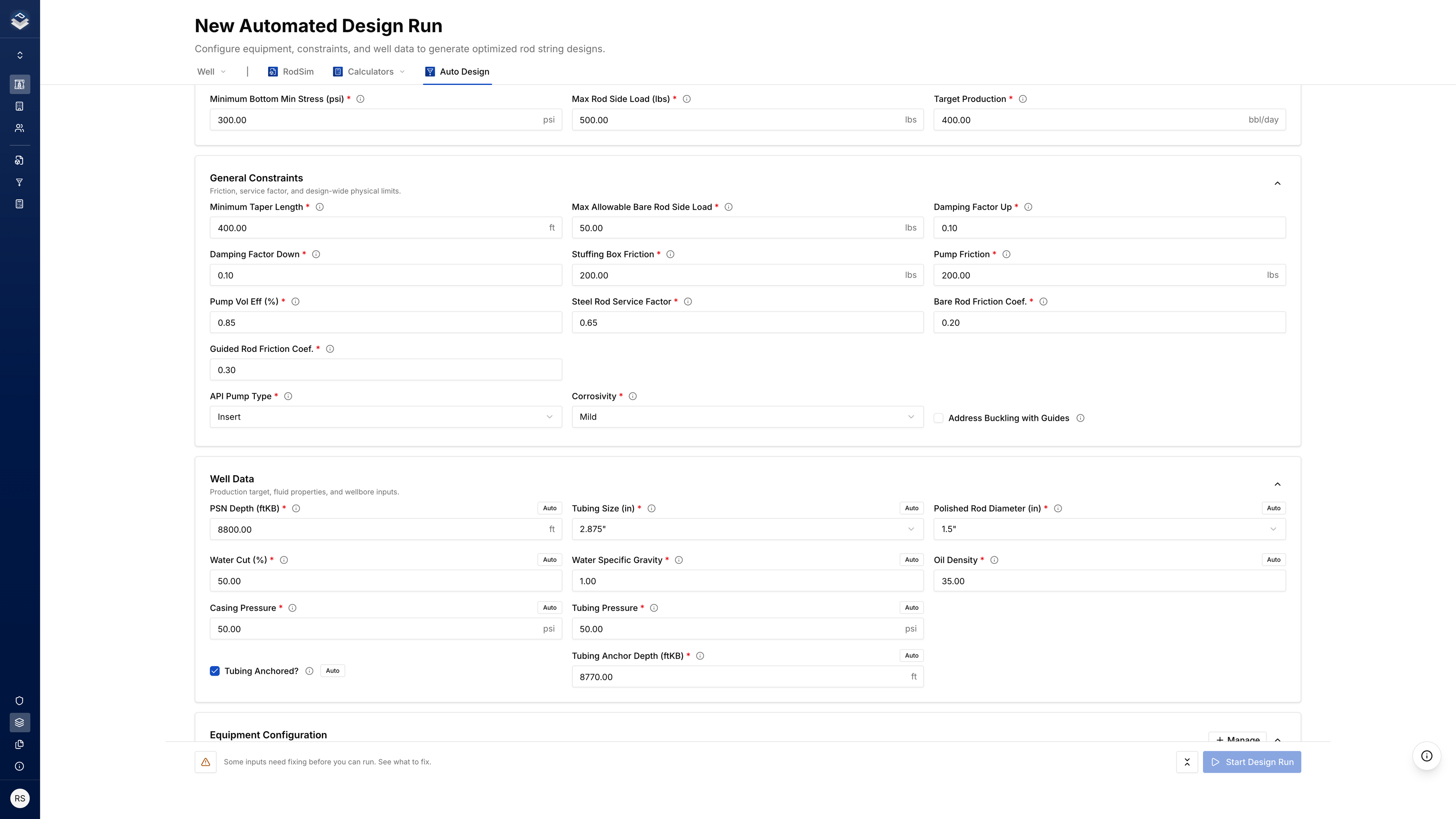
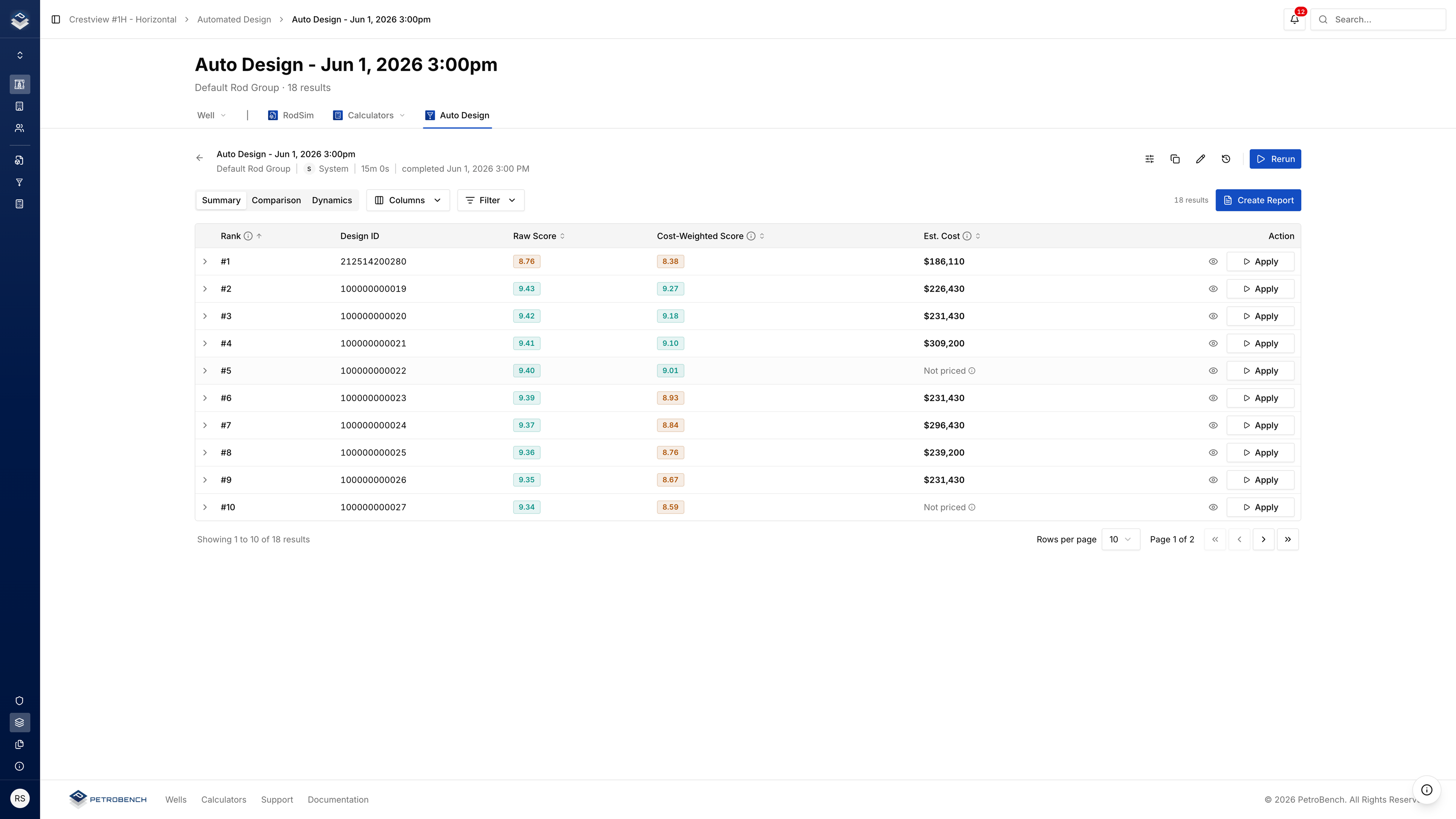
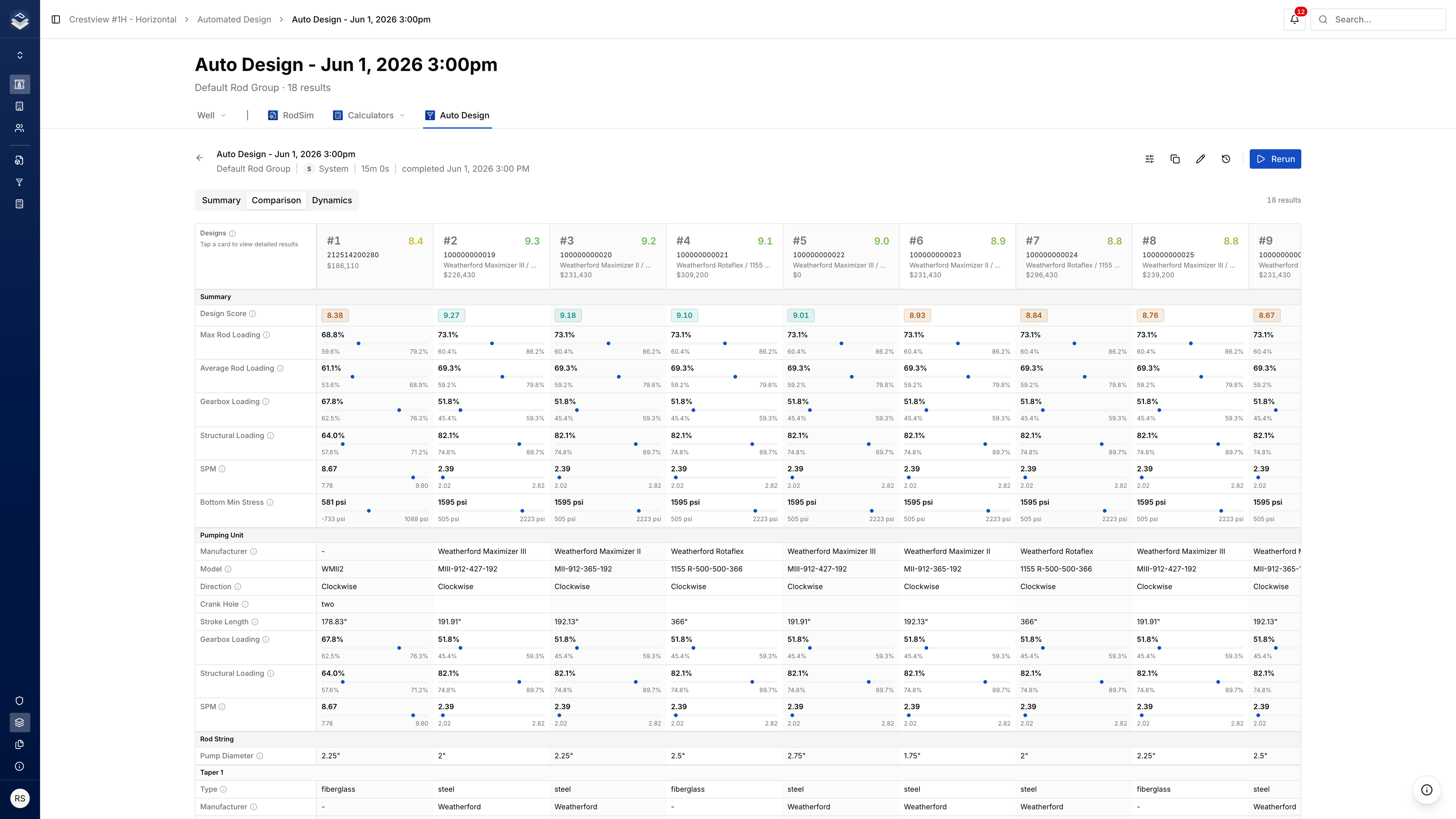
From your equipment options and well data, Automated Design builds pumping unit, pump, and rod combinations, simulates each, and keeps the top 100 ranked by cost and performance.
- 1M+ Filtering
- 200K Primary
- 80K Secondary
- 20K Tertiary
- Top 100 Dynamic
Same Engine. Larger Search
RodSim designs one string. Dynamics sweeps how it runs. Automated Design searches the full space and returns the top 100.
 Dynamics
 Constraints, Ranked Results, Accept
Set the search, review the top 100, and accept the design you take forward on the well.
One Cloud Workspace for Every Well
Designs, roles, and audit history stay on the same well record across teams and regions.
Well Management
Versioned designs, cards, and simulation runs on one well record.
User Management
Roles and licenses scoped by team, region, and division.
Company Management
Regions, org defaults, and audit trails in one admin layer.
- SSO Integration
- Multi-Tenancy
- Bulk Actions
- Security & Audit
- Notifications Center
- Comments & Annotation
Engineers Click. Agents Call
Agents call the same RodSim engine your engineers already run. Vector stays on the open well, sims and reads through the engine, writes behind guardrails with a full audit trail.


Ask Vector, or click Run in the workspace. Both hit the same RodSim engine on the well you have open.
Drafts sit behind write guardrails. Nothing hits the live well until an engineer signs off.
Inputs and outputs land on the well record. Open the run later and see what RodSim returned.
Three Roles. One Workspace
Engineers design. Operations review. IT connects the stack. Same wells and permissions for all three.
Design and Simulate in the Browser
Import wells, run RodSim, and compare designs. Every simulation stays versioned.
- Import wells and files
- Run cloud simulations
- Version history
Review the Same Well
Results and designs on one well record. Vector can inspect; writes need engineer approval.
- Shared well record
- Drift visible in workspace
- Writes need signoff
Connect SSO. Keep Data Yours
SSO with SAML or OIDC. Connect Snowflake, Databricks, Azure, AWS, or WellView. Audit log on every action.
- SSO and role-based access
- Native data connectors
- Full audit log
Import Wells. Connect Your Warehouse.
Drop in well files or connect your lake so every sim runs on current field data.
-
 RSDX
RSDX -
 RSVX
RSVX -
 INP6E
INP6E -
 XLSX
XLSX

- Rod string RSDX
- Pump and tubing RSDX
- Production history Snowflake
- Directional survey WellView
Legacy File Import
Import RodStar and SRod well files by drag-and-drop or bulk module, rod string, pump, and history load without rebuild.
Enterprise Connectors
Native connections to Snowflake, Databricks, Azure, AWS, and WellView. Same credentials and permissions as the rest of the platform.
Questions Operators Ask
Answers before you book a walkthrough.
Yes. RodSim runs in the shared workspace, not on one laptop. The same well opens the same way for every engineer on the team.
Yes. Run the same wells in PetroBench next to your current desktop tool. Engineers compare numbers on wells they already know before the team moves the well of record into the workspace.
Yes. Bulk import brings in the common legacy formats so well files and rod strings come across without rebuilding.
Yes. Native connectors pull wells, surveys, and production data into PetroBench. File import stays available when a connector is not the path.
Most teams import a set of wells they already know, run those in the workspace, compare side by side with their current tool, then widen regions once the team is comfortable.
More questions? Contact Us
See PetroBench on One of Your Wells.
Start with a well you already design. We run RodSim in the workspace and compare designs side by side on that well.
Our scheduling system is temporarily unavailable. Click below to schedule directly or contact us.
Have questions or need help with something else? Get in touch